
AI Technology Explained for Beginners
If AI feels everywhere all at once - inside search, chatbots, study apps, workplaces, and even your phone - you are not imagining it. But for most beginners, the real challenge is not seeing AI. It is understanding what it actually is, how it works, what it can and cannot do, and how to use it without getting overwhelmed.
For students, exam candidates, professionals earning certifications, and lifelong learners, that confusion creates a real problem: too many tools, too much hype, and not enough clarity. This guide offers exactly that. You will get a plain-English breakdown of modern AI, the core terms that matter, the biggest risks to watch, and the smartest ways to use AI for learning and performance.
At CramAI, we see this every day. People do not just want AI answers - they want better understanding, source-backed support, adaptive study guidance, and a faster route from confusion to confidence. That is why the most useful AI in education is not just flashy generation. It is structured help: personalized study plans from uploaded materials, traceable answers anchored to source content, dynamic assessments that reveal knowledge gaps, and study strategies that adjust in real time.
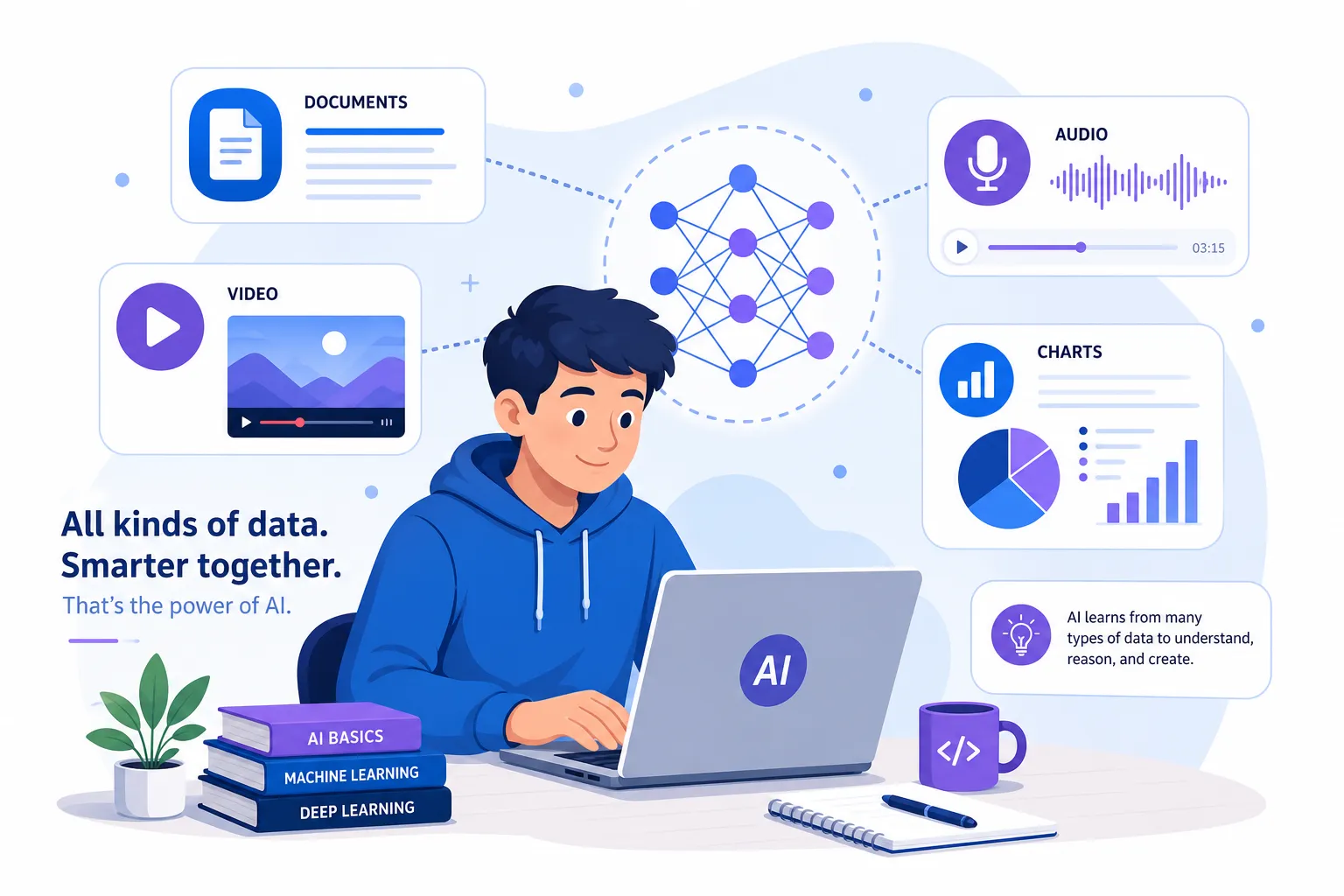
Why AI Matters Right Now
The current wave of AI is not important simply because it is new. It matters because it is becoming a general-purpose layer across work, education, communication, and decision-making.
In practical terms, AI can help people:
process large amounts of information faster
summarize difficult material
detect patterns humans might miss
automate repetitive tasks
generate drafts, explanations, visuals, or code
personalize learning and support at scale
That is especially relevant in education. Learners are under pressure to absorb more information in less time, often across PDFs, lectures, videos, websites, slides, and audio. Traditional study methods break down when the volume becomes too large. AI can reduce cognitive load by helping learners focus on what matters most, what they do not understand yet, and what they should review next.
"As of late 2024, nearly 40% of U.S. adults aged 18-64 reported using generative AI." - National Bureau of Economic Research
The takeaway is simple: AI adoption is already happening. The real advantage now comes from learning to use it well, not merely using it at all.
What Is Artificial Intelligence?
Artificial intelligence is the broad field of building computer systems that can perform tasks we usually associate with human intelligence.
These tasks include:
recognizing patterns
understanding language
making predictions
classifying information
generating content
recommending actions
solving defined problems
A simple way to think about it: AI helps machines make useful decisions or outputs based on data.
That does not mean machines are conscious, self-aware, or truly “thinking” like humans. In most real-world cases, AI is highly capable pattern recognition plus prediction.
A Beginner-Friendly Definition
If you want the shortest possible version of AI technology explained:
AI is technology that learns from data to help computers recognize, predict, generate, or decide.
That is the foundation behind recommendation engines, facial recognition, spam filters, voice assistants, adaptive learning systems, and tools like modern AI chatbots.
How AI Works
Most modern AI systems rely on three ingredients:
Component | What It Does | Simple Analogy |
|---|---|---|
Data | Provides examples or input | Study material for a student |
Algorithms | Define how the system learns patterns | The study method |
Compute power | Runs training and inference | The energy and tools needed to study fast |
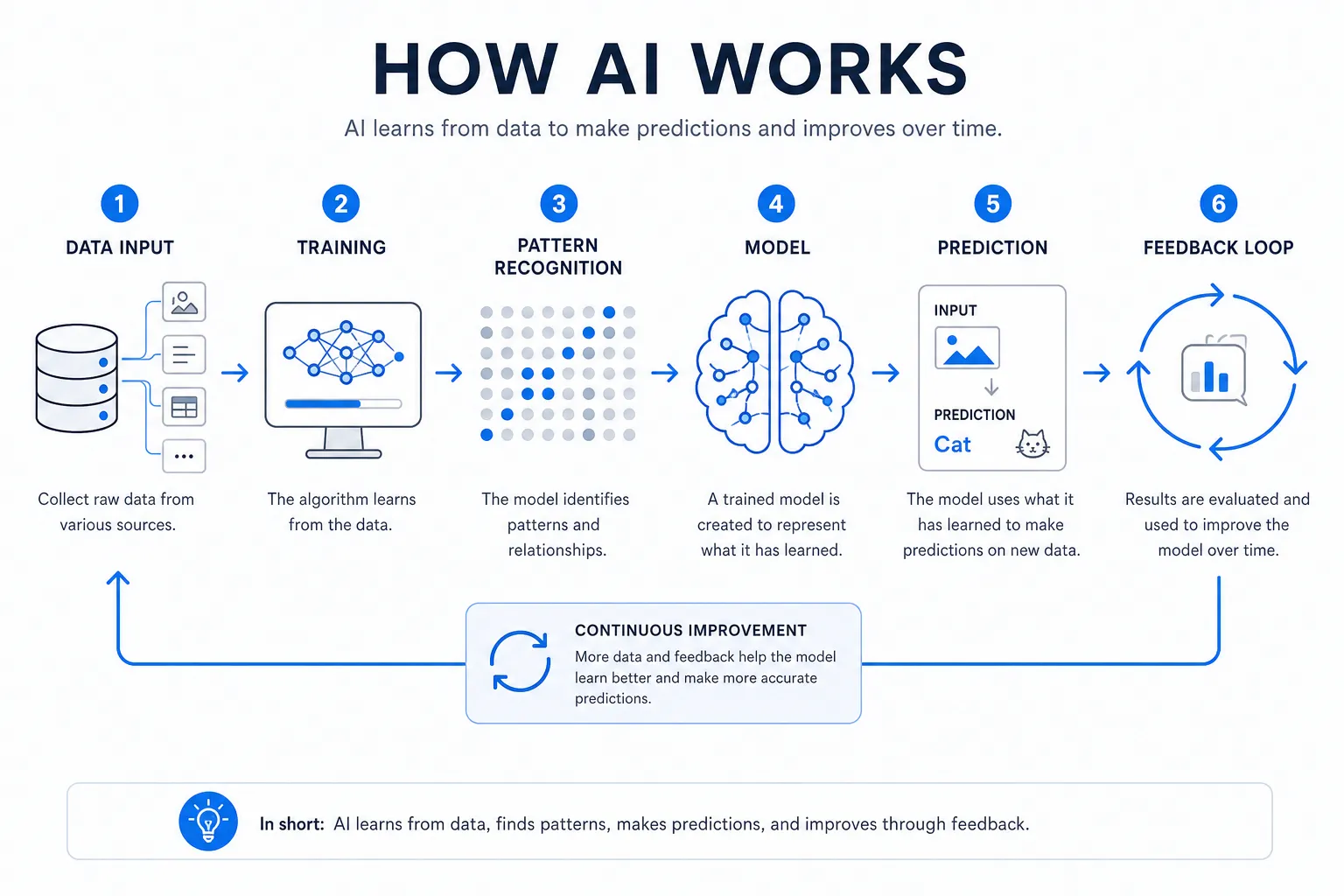
The Basic Flow
Input data is collected
This could be text, images, audio, video, numbers, or behavior logs.The model trains on patterns
It finds relationships, similarities, structures, and signals in the data.The system makes predictions or generates output
For example, classifying an image, answering a question, or suggesting the next word.Feedback improves performance
Models are refined using testing, human review, or additional data.
Think of It Like Learning by Example
Traditional software follows explicit rules. AI often learns from examples instead.
Instead of programming every possible rule for identifying a cat, you show the system thousands of labeled cat images. It gradually learns what visual patterns tend to indicate “cat.”
The same principle applies to language. A large language model learns from vast amounts of text and predicts what words are likely to come next in a given context.
The Core Concepts Every Beginner Should Know
Competitor articles usually explain AI at a high level, but they often skip the terms that actually help beginners navigate tools confidently. Here are the essentials.
Machine Learning
Machine learning is a subset of AI where systems learn patterns from data rather than following only hard-coded rules.
If AI is the umbrella, machine learning is one of the main methods underneath it.
Deep Learning
Deep learning is a specialized form of machine learning that uses layered neural networks. It is especially powerful for:
image recognition
speech processing
natural language understanding
generative AI
Neural Networks
Neural networks are mathematical structures inspired loosely by the brain. They process input through multiple layers to detect complex relationships.
You do not need to master the math to understand the outcome: they are very good at learning subtle patterns in big datasets.
Natural Language Processing
Natural language processing, or NLP, is the branch of AI focused on understanding and generating human language.
It powers:
chatbots
translation tools
voice assistants
summarizers
writing assistants
question-answering systems
Computer Vision
Computer vision helps machines interpret images and video.
It is used in:
facial recognition
medical imaging
autonomous vehicles
manufacturing inspection
document scanning
Generative AI
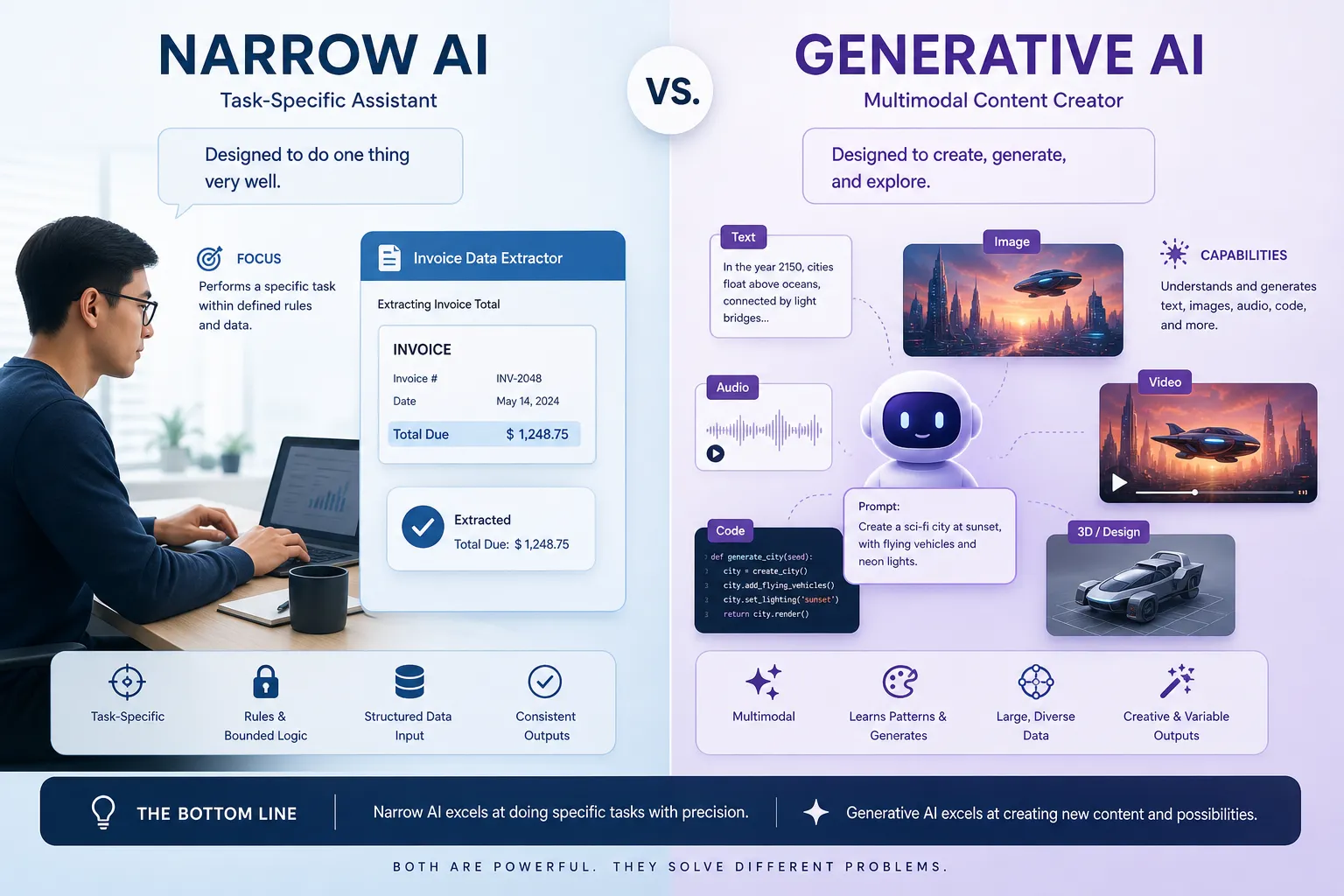
Generative AI is AI that creates new content such as text, images, audio, video, code, quizzes, explanations, or summaries.
This is the category behind many of the tools people are currently exploring. But the best use cases are not just “make content.” They are often help me understand, organize, compare, and apply knowledge faster.
AI vs Machine Learning vs Generative AI
This distinction confuses many beginners, so here is the cleanest way to separate them.
Term | Meaning | Example |
|---|---|---|
AI | Broad field of intelligent computer systems | A recommendation engine |
Machine Learning | AI systems trained on data patterns | Fraud detection model |
Generative AI | AI that creates new content | Chatbot that writes a summary |
A lot of content online mixes these terms casually. For beginners, accuracy matters. When people say “AI” today, they often specifically mean generative AI tools built on machine learning models.
Types of AI You Will Hear About
Artificial Narrow Intelligence
Artificial Narrow Intelligence, or ANI, is the kind of AI we actually have today. It is designed for specific tasks.
Examples include:
email spam filtering
recommendation systems
image recognition
speech-to-text
study summarization tools
AI exam prep assistants
ANI can be highly effective, but it is still task-bounded.
Artificial General Intelligence
Artificial General Intelligence, or AGI, refers to a hypothetical future AI that could reason across domains like a human.
It does not exist today.
Reactive, Limited-Memory, and Emerging Agentic Systems
A more practical way to classify current tools is by how they operate:
Type | Description | Example |
|---|---|---|
Reactive systems | Respond to input without persistent memory | Basic game-playing model |
Limited-memory systems | Use recent context or past data | Chat assistant remembering your conversation |
Agentic systems | Can plan, reason across steps, and take actions | AI workflow assistant using tools and APIs |
This matters because newer tools increasingly move from “answer a prompt” toward “help complete a goal.”
What Modern AI Can Actually Do
A big content gap in many beginner articles is that they either overhype AI or reduce it to trivial examples. The useful question is: what can it reliably do today?
Strong Use Cases
AI is especially useful for:
summarizing long material
extracting key ideas
rewriting for different reading levels
generating practice questions
classifying and tagging information
comparing concepts
detecting patterns in data
assisting with coding
translating language
drafting first versions of content
identifying likely knowledge gaps
For learners, that means AI can become a strategic support layer rather than just a chatbot.
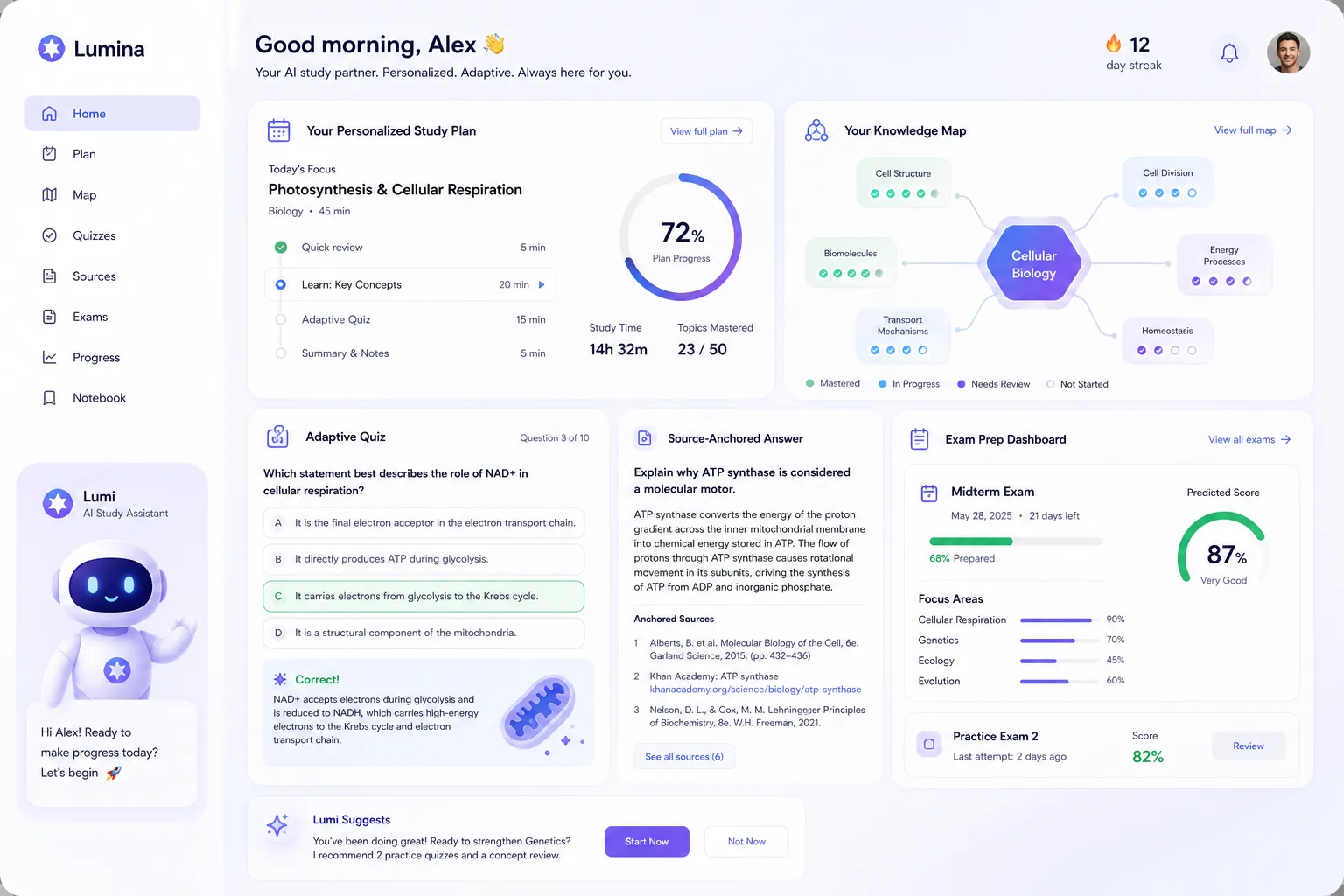
With CramAI, that support becomes more structured: users can upload PDFs, URLs, YouTube videos, audio, documents, and slides, then convert them into personalized study plans, source-anchored explanations, connected topic maps, and dynamic review paths.
What AI Still Struggles With
AI remains weak at:
true understanding of meaning in the human sense
guaranteed factual accuracy
nuanced judgment in unfamiliar edge cases
value-based decisions
ethical reasoning
long chains of flawless logic
knowing when it is wrong
That is why trusted AI experiences need traceability, source anchoring, and human review, especially in education and certification prep.
Why AI Feels So Smart
Modern AI often feels intelligent because it is excellent at predicting plausible outputs.
For example, a large language model does not “know” in the way a teacher or expert knows. It predicts likely word sequences based on the patterns it learned during training. Because those patterns come from enormous amounts of language data, the outputs can appear fluent, relevant, and surprisingly useful.
But fluency is not the same as truth.
That is one reason CramAI’s source-grounded approach matters: when answers are tied back to the original learning material, learners can verify where the explanation came from instead of relying on unsupported generation.
Real-World AI Examples Beginners Already Use
Most people are already using AI, even if they do not think of it that way.
In Daily Life
maps and route optimization
streaming recommendations
email spam filters
predictive text
photo enhancement
voice assistants
In Work
meeting transcription
data analysis support
code assistance
content drafting
workflow automation
customer service chatbots
In Education
tutoring support
automated feedback
adaptive learning systems
language practice
quiz generation
study planning
In Healthcare
medical image analysis
risk prediction
administrative automation
drug discovery support
AI in Education: Where It Becomes Truly Useful
This is where beginner-focused content often stays too generic. AI in education is not just about asking a chatbot for an answer. The real opportunity is learning design.
The Shift from Information Access to Study Strategy
Students do not usually fail because information is unavailable. They fail because:
the material is fragmented
they do not know what to prioritize
they misunderstand concepts without realizing it
they review too passively
they cannot connect topics deeply enough
they waste time on low-impact study activities
AI can solve these problems when it is built around the learning cycle.
What High-Value AI Study Support Looks Like
A high-performing study platform should help users:
Need | Why It Matters | How CramAI Fits |
|---|---|---|
Upload mixed materials | Learning inputs come in many formats | Supports PDFs, URLs, YouTube, audio, docs, slides |
Build a plan | Learners need structure, not just answers | Creates personalized study plans |
Verify information | Trust matters in exam prep | Source-anchored answers with traceability |
Find weak spots | Blind spots hurt performance | Dynamic assessments identify gaps |
Adapt in real time | Static plans become outdated quickly | Study strategies update automatically |
Connect concepts | Deep understanding improves retention | Topic linking and knowledge mapping |
Scale support | Institutions and teams need consistency | Works for individuals and organizations |
That is why CramAI is more than a question-answering tool. It is an all-in-one AI learning and exam prep support system built to help people learn, test, assess, guide, and improve continuously.
The Biggest Myths About AI
Myth 1: AI Understands Everything
Reality: AI often produces highly convincing language without true comprehension.
Myth 2: AI Is Always Objective
Reality: models can reflect biases in training data, design choices, or deployment context.
Myth 3: AI Replaces Learning
Reality: poorly used AI can weaken learning, but well-structured AI can dramatically improve it by focusing effort, clarifying confusion, and accelerating feedback.
Myth 4: More AI Automatically Means Better Results
Reality: many organizations adopt AI without changing workflow design, which limits impact.
"A 2026 study found that 89% of surveyed executives reported no productivity improvements from AI adoption, despite 69% of companies using AI tools." - National Bureau of Economic Research, as cited by TechRadar
The lesson is important: AI only creates value when paired with better systems, better prompts, better verification, and better user behavior.
The Risks and Limitations of AI
Any honest article on ai technology explained for beginners should cover the downside clearly.
Hallucinations
AI can generate false or invented information confidently. This is especially risky in education, medicine, law, and certification prep.
Bias
If training data includes skewed or unfair patterns, the model can reflect or amplify them.
Privacy Concerns
Sensitive documents, personal data, and proprietary materials need careful handling in AI systems.
Overreliance
If users copy outputs without thinking, they may reduce real comprehension.
Poor Source Visibility
Many tools give polished answers without showing where the information came from. That weakens trust.
This is precisely why source traceability is such a meaningful differentiator in learning systems. When learners can inspect the origin of an answer, they gain more than convenience - they gain confidence and accountability.
How to Use AI Well as a Beginner
The smartest beginners do not just ask better prompts. They build better habits.
Start With a Clear Goal
Ask yourself:
Do I want an explanation?
Do I want a summary?
Do I want practice questions?
Do I want a study plan?
Do I want to compare two concepts?
The clearer the goal, the better the AI output.
Give Better Input
AI performs better when it has context. Uploading your real material often beats asking broad generic questions.
That is why multimodal study input matters. A learner preparing for IELTS, a graduate exam, or a professional certification often has:
lecture slides
textbook chapters
PDFs
YouTube explainers
notes
audio lessons
A platform like CramAI can unify those inputs and turn them into a coherent learning system.
Verify Important Claims
For anything high-stakes, check sources. Use tools that show evidence and origin rather than unsupported confidence.
Use AI to Learn, Not Just Finish
The goal should not be “get an answer fast.” The goal should be:
understand faster
remember better
identify weak spots earlier
practice more intelligently
reduce wasted effort
Reassess Often
Strong learning is iterative. AI is most valuable when it helps you detect what changed - what you now understand, what remains weak, and what to study next.
A Smarter Beginner Framework for Evaluating AI Tools
Most articles stop at definitions. A more useful next step is evaluating tools with a simple rubric.
Question | Why It Matters |
|---|---|
Does it explain clearly? | Beginners need comprehension first |
Does it show sources? | Trust depends on traceability |
Can it work with my actual materials? | Generic help is weaker than grounded help |
Does it identify gaps? | Hidden weaknesses are costly |
Does it adapt over time? | Static support quickly loses value |
Does it reduce cognitive overload? | Simplicity improves follow-through |
Can it scale to teams or institutions? | Useful for organizations, not just individuals |
CramAI scores strongly here because it is designed around the full learning journey, not just one-off responses. It supports individuals preparing for exams, professionals building new skills, institutions deploying AI learning support at scale, and creators who want to organize knowledge and generate educational content efficiently.
AI for Students, Professionals, and Knowledge Creators
Students and Exam Candidates
AI can help transform scattered study material into:
concise summaries
guided revision paths
custom quizzes
linked concept maps
targeted review sessions
Busy Professionals
Certification prep, compliance learning, and upskilling become more manageable when AI can:
extract key points from dense material
generate practice questions
highlight weak areas
tailor a plan to a limited schedule
Educators and Knowledge Creators
AI is also increasingly valuable for people who build and teach knowledge. Creator-focused tools can help with:
organizing expertise into systems
generating structured educational content
turning notes into teachable assets
building a personal knowledge brand
CramAI’s Creator Studio fits naturally here by supporting knowledge organization and content generation alongside learner-facing study support.
The Future of AI: What Beginners Should Watch
The next phase of AI will likely be defined less by novelty and more by integration, reliability, and personalization.
What Is Likely to Grow
multimodal AI across text, audio, video, and documents
more personalized tutoring and coaching systems
stronger AI agents that perform tasks across tools
improved enterprise and institutional deployment
more source-grounded and auditable learning systems
What Will Matter Most
The winners will not simply be the loudest tools. They will be the systems that combine:
usefulness
trust
adaptability
low friction
measurable outcomes
In education, that means moving from generic chatbot interaction toward evidence-based, adaptive learning ecosystems.
Final Verdict
AI is not magic, and it is not a replacement for human judgment. But it is one of the most important technologies shaping how we learn, work, and make decisions.
If you are a beginner, the best way to approach AI is not with fear or blind excitement. Approach it with structure:
learn the core concepts
understand the limits
use source-backed tools
focus on outcomes, not hype
choose systems that help you think better, not just faster
That is where CramAI stands out. Instead of offering disconnected answers, it supports the full learning cycle with personalized study plans, multimodal material support, source-anchored responses, concept linking, adaptive assessments, real-time strategy adjustment, and scalable tools for learners, educators, creators, and organizations.
If you want AI to do more than impress you - if you want it to actually improve how you study, prepare, and understand - CramAI is a smart place to start.
FAQ
What is the simplest way to explain AI?
AI is technology that learns from data to help computers recognize patterns, make predictions, or generate useful outputs. In simple terms, it helps machines do tasks that normally require some level of human judgment, such as understanding language or recommending what to study next.
How to explain AI for dummies?
Explain AI as a computer system that gets better by seeing lots of examples. Instead of following only fixed rules, it learns patterns from data and uses those patterns to answer questions, spot trends, or create content.
What did Elon Musk say about AI?
Elon Musk has repeatedly warned that AI can be powerful and potentially risky if developed without safeguards. His comments are often used to highlight the need for careful oversight, responsible development, and human control as AI systems become more capable.
What 3 jobs will not be replaced by AI?
Jobs centered on deep human empathy, complex leadership, and hands-on care are less likely to be fully replaced. Examples include therapists, senior strategic leaders, and healthcare professionals who rely on trust, judgment, and real-world human interaction.
How to explain AI to an older person?
Use familiar examples like spam filters, GPS directions, or voice assistants. Then explain that AI is simply software that learns from lots of past information to make helpful guesses or suggestions, much like a person getting better with experience.