

Stop Switching Between Study Apps: Build One Complete Exam Prep Workflow
Picture a typical exam week.
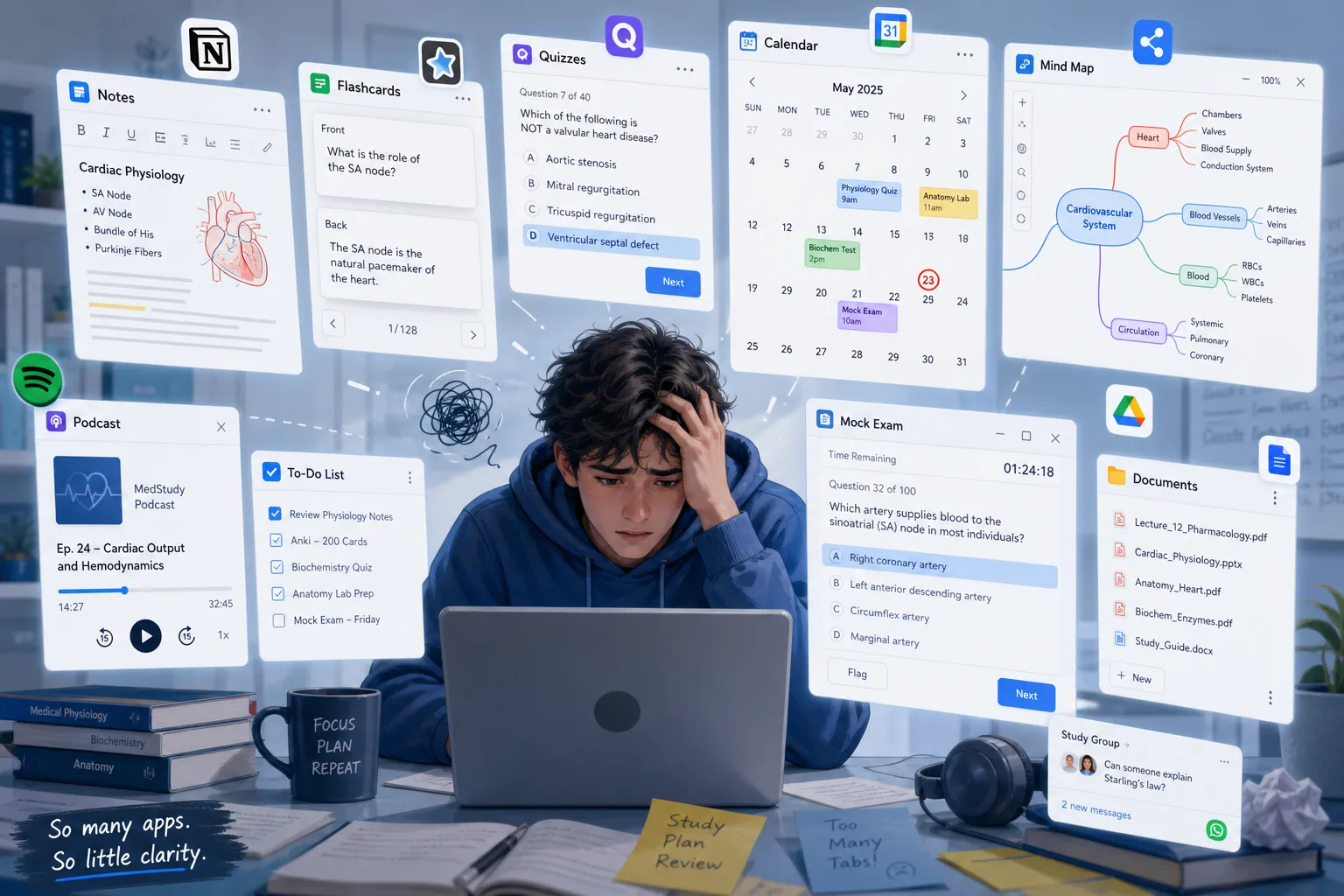
Your lecture slides live in Google Drive. Your study plan is in Notion. Your class notes are split between Apple Notes and a PDF annotator. Mind maps sit in a diagram tool. Flashcards are in Anki or Quizlet. Quizzes are in a separate app. You save useful links in a browser folder, listen to revision podcasts in another platform, ask AI questions in a chatbot, and take mock exams somewhere else entirely.
At first, this feels organized. In reality, it creates a fragmented exam prep workflow where every study action starts with friction: find the file, re-upload the document, copy the notes, check the flashcards, compare quiz scores, then guess what to revise next.
That is the real problem. Most learners do not need more isolated tools. They need a connected system that turns materials into understanding, understanding into practice, and practice into measurable exam improvement.
In this guide, we will break down the hidden cost of app switching, show what a complete AI study workflow looks like, and explain how an integrated workspace like CramAI can support the full learning cycle without forcing you to rebuild context at every step.
Why fragmented study workflows feel productive but underperform
The strongest competitor articles all point to the same truth: learners often confuse organizing with learning. Planning, tagging, formatting, and moving materials around can feel like progress, but they are not the same as recall, reasoning, and exam performance.
What most articles miss, though, is the workflow layer.
The issue is not only that note-taking apps are weaker than retrieval practice, or that flashcards are effective when used well. The issue is that when your study stack is scattered across multiple platforms, your learning process becomes discontinuous. Each tool may be good on its own, but the transitions between them create invisible drag.
The hidden costs of switching between study apps
A fragmented setup usually creates six recurring problems:
1. You repeatedly upload or copy the same materials
A single chapter might be uploaded into a note tool, pasted into an AI chat, turned into flashcards elsewhere, and then summarized again for a quiz platform. That is duplicated effort before real studying even begins.
2. You lose track of versions
Which summary is the latest one? Did you revise the annotated PDF or the copied notes? Are your flashcards based on the newest lecture slides or the old ones? Version confusion quietly damages accuracy.
3. Notes and progress become scattered
Your explanations are in one place, your practice scores in another, and your revision schedule somewhere else. When performance data and study artifacts are disconnected, it becomes harder to see what is actually working.
4. Information becomes inconsistent across tools
One app might have updated definitions, another still shows older wording, and a third contains a simplified AI explanation with no reference to the source. Inconsistent content creates avoidable misunderstandings.
5. Time disappears in platform switching
The time cost is rarely dramatic in one moment. It accumulates through dozens of micro-decisions: log in, search, import, rename, locate, compare, switch, and resume.
"After an interruption, it takes an average of 23 minutes and 15 seconds to regain full focus on the original task." - The Real Cost of Context Switching: Neuroscience Behind Lost Productivity
6. It becomes hard to connect study behavior to exam performance
If your mock exam score is low, was the problem your notes, your flashcards, your revision timing, your quiz quality, or your understanding of the source material? Multi-app systems often make diagnosis harder than it should be.
The real goal: continuity across the entire learning cycle
A high-performing study app for exams should not just offer many features. It should preserve continuity.
That means one environment where you can:
import source materials once
generate a study plan from those materials
produce summaries, notes, and concept maps from the same source
ask source-anchored questions with traceability
create recall tools like flashcards and quizzes
run mock exams
assess weak areas
automatically adjust what to study next
That continuity is what reduces cognitive load. You stop spending energy on system maintenance and start spending it on learning.
What competitors get right - and what they miss
Across the competitor articles, three strong themes appear repeatedly:
Common competitor insight | Why it matters | What is still missing |
|---|---|---|
Active recall beats passive review | Retrieval practice improves retention | Few articles explain how recall should connect back to the original source material |
Spaced repetition helps over cramming | Timing matters for long-term memory | Most stop at flashcards and do not connect spacing to full exam workflows |
Simplicity and consistency beat complex setups | Students abandon overbuilt systems | They rarely show how one integrated workspace can unify planning, learning, testing, and adaptation |
The content gap is clear: many articles compare categories of apps, but very few explain how a single end-to-end workflow should operate from first import to final mock exam. That is where an all in one study app becomes strategically useful.
Fragmented workflow vs. integrated workflow
Here is the practical difference.
Stage | Fragmented multi-app workflow | All-in-one workflow |
|---|---|---|
Material import | Upload files into multiple tools | Import once and reuse everywhere |
Study planning | Manually create tasks from scattered sources | Generate a personalized plan from uploaded materials |
Notes and summaries | Rewrite or copy across apps | Create summaries and notes directly from source content |
Mind maps and concept links | Built separately from notes | Auto-link topics and visualize relationships in context |
Flashcards and quizzes | Recreate content from notes manually | Generate recall tools from the same trusted material |
AI explanations | Ask in a separate chatbot, then paste back | Ask inside the workspace with source traceability |
Progress tracking | Scores, notes, and weak areas are split | Learning data stays connected across activities |
Mock exams | Taken in separate platforms | Practice exams tie directly to prior materials and performance history |
Strategy adjustment | Student guesses what to review next | System identifies knowledge gaps and updates the plan |
The key point is not convenience for its own sake. It is continuity. A complete exam prep workflow allows every stage to inform the next.
What one complete exam prep workflow should look like
An effective integrated workflow has five connected layers.
1. Import: start with source materials, not blank pages
The best workflows begin with what learners already have:
PDFs
slide decks
website URLs
YouTube videos
audio recordings
lecture notes
documents
Instead of forcing students to rebuild content manually, the system should transform these materials into structured study assets.
CramAI follows this model by allowing users to upload materials in multiple formats, then turning them into personalized study plans, summaries, visualized knowledge maps, and connected topic insights. That matters because the workflow begins with actual course content, not generic templates.
Why this stage matters
If your import stage is weak, every later stage becomes slower and less trustworthy. Learners either waste time reformatting content or rely on tools that answer without clear grounding in the source.
2. Organize: create a study plan that reflects the exam reality
A real exam prep workflow must do more than store information. It has to prioritize.
That means the system should help answer:
What should I study first?
Which topics are foundational?
Which areas are most likely to affect my score?
How much time should I spend on each topic?
What should I review again tomorrow?
This is where an AI study workflow becomes more valuable than static planning tools. A good system should not merely host your to-do list; it should convert your materials into an adaptive study path.
With CramAI, the emphasis is on personalized study plans generated from uploaded materials and adjusted over time as the learner progresses. That is a stronger model than planning in isolation, because the study sequence comes from content and performance data together.
3. Learn: unify notes, source answers, and concept connections
Most learners need more than a summary. They need a way to move between the big picture and the detail.
A strong integrated workspace should support:
concise summaries for first-pass understanding
deeper notes for closer review
concept linking across topics
mind-map style visualization
Q&A tied back to the original source
This matters because understanding is not linear. You often learn by jumping between chapter sections, clarifying terms, and linking one idea to another. If those actions happen in separate apps, comprehension becomes fragmented too.
Why traceability matters
One of CramAI’s strongest differentiators is source-anchored answers with traceability. In practice, this means learners can inspect where an answer came from rather than treating AI output as a black box.
That is especially useful for:
high-stakes exam candidates
certification learners who need precise wording
educators and creators building trustworthy materials
organizations that need more controlled, auditable learning support
4. Practice: turn knowledge into retrieval and performance signals
Once content is understood, it has to be tested.
Competitor content correctly emphasizes active recall and spaced repetition, but often limits the conversation to flashcards alone. In reality, an exam prep workflow should support several forms of retrieval:
flashcards for fast recall
quizzes for section-level checks
oral review or podcast-style revision for passive reinforcement between sessions
mock exams for performance under pressure
"Retrieval practice produced an average effect size of g = 0.61 compared to restudying." - Are Flashcards Active Recall?
That is why practice should be generated from the same source materials used for learning. If your flashcards, quizzes, and mock exams are disconnected from your actual syllabus inputs, practice quality becomes inconsistent.
5. Assess and adapt: let performance change the plan
This is the stage many tools underdeliver on.
A complete workflow should connect study behavior to outcomes. If you keep missing questions on one concept cluster, the system should surface that pattern. If your understanding improves, it should adjust review intensity. If a practice exam shows weak transfer under timed conditions, it should shift from passive review toward active testing.
This adaptive loop is where integrated platforms have a real strategic advantage.
CramAI positions this as dynamic assessment and adaptive study planning: identifying knowledge gaps and automatically adjusting preparation strategies in real time. That is not about adding more features. It is about making the workflow responsive.
A better model: the connected exam prep loop
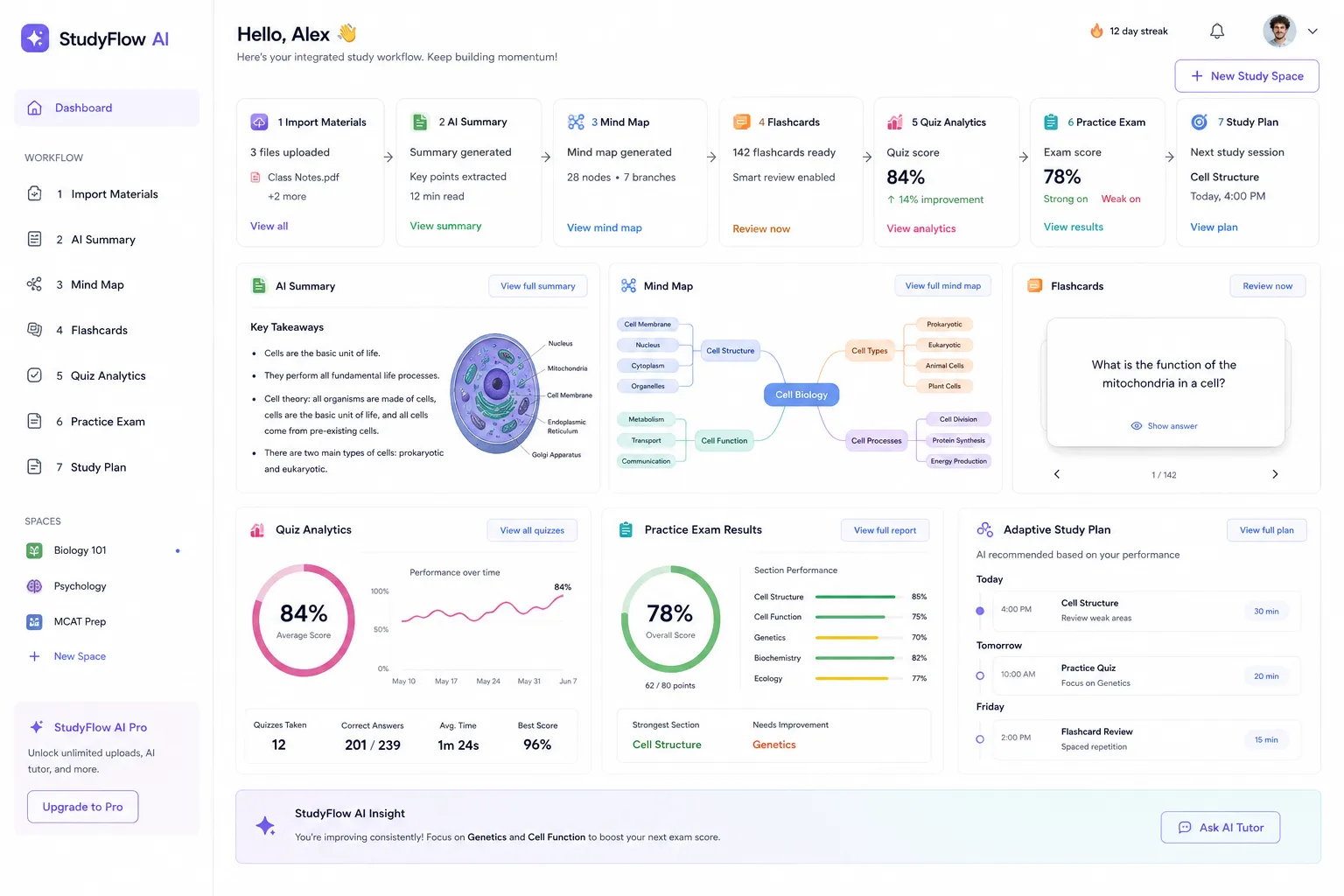
A modern all in one study app should support a loop like this:
Import
Bring in your real learning materials once.
Transform
Generate summaries, notes, topic maps, question sets, and study plans from those materials.
Practice
Use flashcards, quizzes, and mock exams built from the same knowledge base.
Diagnose
Identify weak concepts, misconceptions, and performance gaps.
Adapt
Automatically change what gets reviewed next and how it gets reviewed.
Reinforce
Continue with the most relevant material instead of repeating everything equally.
This loop is more efficient because every output feeds the next step.
Where a single workspace improves continuity the most
Some transitions matter more than others. These are the highest-value handoffs to unify.
From notes to flashcards
In a fragmented system, students manually turn notes into cards. In an integrated system, cards are generated directly from validated material, reducing both time and transcription errors.
From explanation to revision asset
When an AI explanation is helpful, it should become part of the study system immediately. If you have to copy it into another app, useful insights are often lost.
From quiz result to study plan
If you miss questions on a topic, that weakness should automatically influence what gets reviewed next. This is where workflow continuity directly improves decision-making.
From topic understanding to full mock exam
Many learners over-practice isolated facts and under-practice exam conditions. An integrated workflow should connect chapter mastery to timed, mixed-topic application.
CramAI as an example of an integrated study workspace
CramAI is best understood not as a collection of disconnected AI features, but as a unified study environment.
A learner can upload PDFs, URLs, YouTube videos, audio files, slides, and documents, then use that content to build a personalized preparation path. From there, the workflow can extend into summaries, knowledge maps, connected topic insights, dynamic assessments, and adaptive next steps.
Because answers are source-anchored and traceable, the platform also addresses one of the biggest concerns in AI-assisted learning: trust. And because the system can adjust strategies in real time based on knowledge gaps, it supports a more efficient exam prep workflow than static tools that leave all prioritization to the learner.
That same logic also extends beyond students. Educators, institutions, enterprise teams, and knowledge creators can use the platform to organize expertise, generate learning content, and scale structured learning support without fragmenting the process across too many systems.
How to move from a scattered setup to one complete workflow
You do not need to replace everything overnight. A practical transition looks like this:
Step 1: choose one primary workspace
Select the environment where your materials, study outputs, and performance feedback will live together.
Step 2: import one real exam unit
Start with one chapter, module, or certification domain instead of your full semester.
Step 3: generate multiple outputs from the same source
Create a summary, concept map, quiz, and revision plan from the same input. This will show you whether the workflow is truly connected.
Step 4: stop duplicating content manually
If you are still pasting notes between apps, the system is not simplified enough.
Step 5: compare practice data to your plan
Use quiz and mock exam outcomes to shape the next review block. That is where the workflow becomes intelligent rather than merely centralized.
Common mistakes when trying to build a better workflow
Mistake 1: keeping old tools “just in case”
If every step still requires a backup app, you have not removed the switching cost.
Mistake 2: over-generating content
More summaries, more cards, and more notes are not automatically better. The goal is useful progression, not content inflation.
Mistake 3: separating planning from evidence
A study schedule without reference to your weak areas is just a calendar. Planning should respond to what performance data shows.
Mistake 4: trusting AI without source visibility
If a platform cannot show where an answer came from, it is harder to verify and harder to learn from.
Mistake 5: measuring activity instead of readiness
Time spent in apps is not the same as exam readiness. The right system should connect activity to outcomes.
Who benefits most from an integrated study workflow
This approach is especially useful for:
undergraduate and graduate students juggling multiple content types
standardized test takers such as IELTS candidates
busy professionals preparing for certifications
lifelong learners balancing study with work
educators and creators building structured teaching materials
institutions and teams that need scalable, tailored AI learning support
In all of these cases, the bottleneck is rarely access to more tools. It is the ability to move through the full learning cycle with minimal friction and maximum continuity.
Final verdict
The future of learning productivity tools is not endless app stacking. It is workflow unification.
If your current process forces you to bounce between storage, planning, notes, mind maps, flashcards, quizzes, podcasts, useful links, and mock exams, then your study system is spending too much of your attention on maintenance. The most effective setup is one that connects the entire exam preparation process from import to insight.
CramAI is a strong example of that direction: an integrated workspace built around source-based learning, adaptive support, connected topic understanding, and dynamic assessment. For students, exam candidates, professionals, educators, and organizations, that kind of continuity can reduce cognitive load and make every study session more strategic.
If you want one system that helps you learn, test, assess, guide, and support your preparation in context, try building your next exam cycle inside CramAI instead of across five or six disconnected platforms.
FAQ
What is the 9 8 7 rule for studying?
The 9 8 7 rule is usually described as a simple routine for protecting sleep, planning revision early, and maintaining consistency before exams. The exact definition varies, but the core idea fits this article: study systems work best when they reduce chaos and support steady, structured preparation instead of last-minute switching.
Which is the No. 1 app for study?
There is no universal No. 1 app for everyone, because the best choice depends on your workflow and exam demands. A strong option is the one that supports planning, learning, practice, and assessment in one connected system rather than forcing you to split these steps across separate tools.
What are 5 study strategies?
Five effective strategies are active recall, spaced repetition, source-based note consolidation, mixed-topic practice, and full mock exams. Together, they help move you from understanding content to applying it under realistic test conditions.
What apps do you use in your workflow?
A fragmented workflow often uses separate apps for storage, planning, notes, flashcards, quizzes, links, and mock exams. This article argues for replacing that with one integrated workspace where materials, study outputs, and performance feedback stay connected.
What is the 80/20 rule in studying?
The 80/20 rule means focusing on the smaller set of topics, question types, or weak areas that drive most of your exam results. In practice, that requires a workflow that can identify high-impact gaps and adapt your study plan around them.
What is the 321 rule of study?
The 321 rule is often used as a simple reflection method, such as reviewing three key ideas, two questions, and one next action after a study session. It works especially well inside an integrated workflow, where review insights can immediately shape the next revision step.