
Learn How to Use AI: Best Ways to Build Skills
If you want to learn how to use AI without getting buried in jargon, code, or hype, the good news is simple: you do not need to become a machine learning engineer to get real value from AI. You need a practical system for using it in everyday work, study, and life.
For students, exam candidates, lifelong learners, busy professionals, and educators, the challenge is rarely access. AI tools are everywhere. The real problem is knowing which skills matter first, how to avoid misinformation, and how to build habits that make AI genuinely useful instead of distracting.
That is exactly where a structured approach matters. Whether you want to summarize readings, draft emails, prepare for exams, organize research, or improve decision-making, the fastest way to learn to use AI is to combine foundational understanding with repeatable practice.
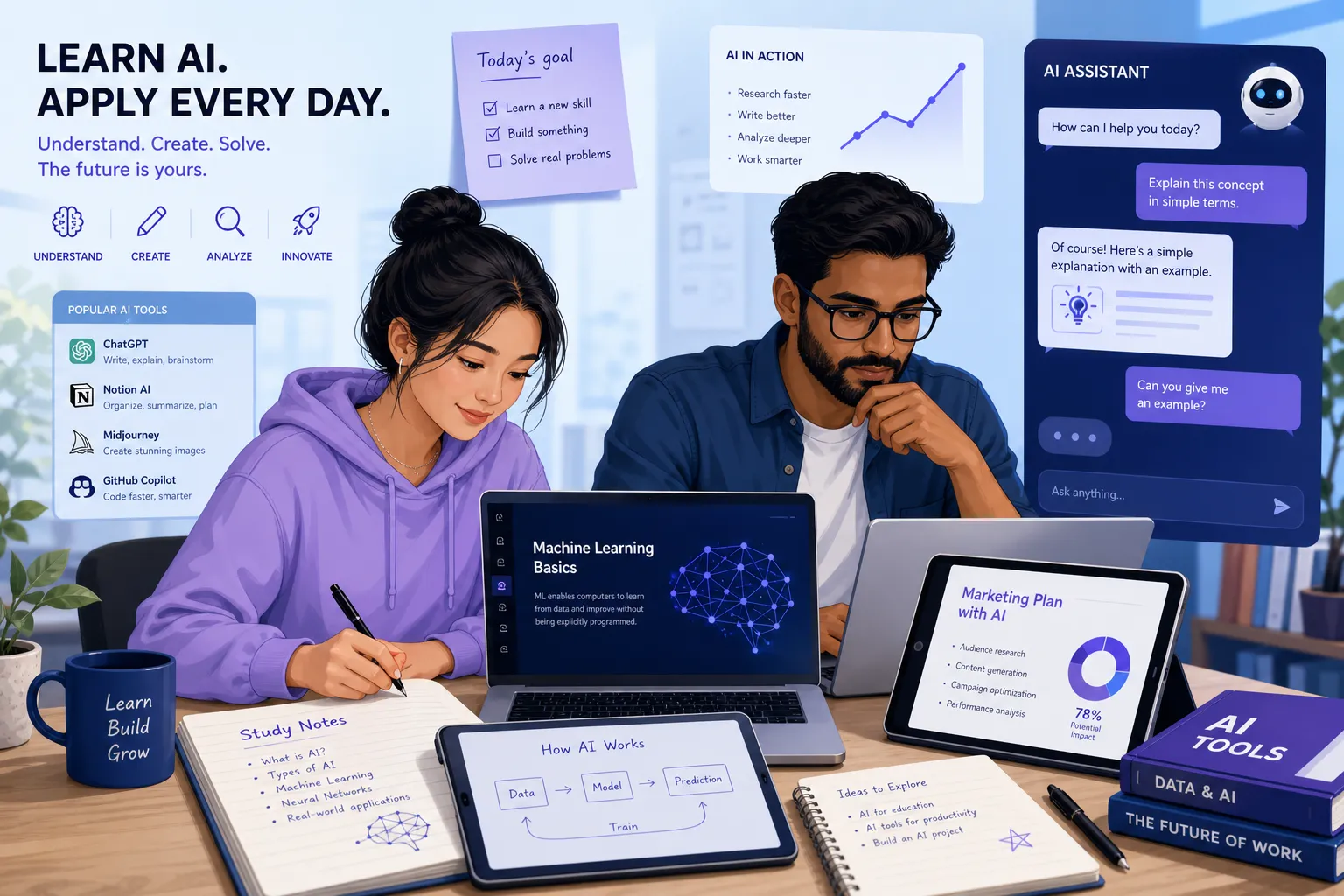
In this guide, we will cover:
what AI skills actually matter for beginners
the easiest tools to start with
the most common mistakes people make
a step-by-step roadmap for building confidence
how platforms like CramAI make AI learning more trustworthy, personalized, and results-driven
Why Learning AI Matters Now
AI is no longer a niche technical topic. It is becoming part of search, writing, research, productivity, customer support, coding, content creation, and education.
"According to the World Economic Forum, research indicates that reaching a beginner level in artificial intelligence (AI) skills requires approximately 30 hours of learning." - World Economic Forum
That matters because many people assume AI is too advanced to start. In reality, foundational AI literacy is now one of the most accessible high-value skills you can build.
"85% of Google Cloud learners have developed expertise in generative AI, and 86% of decision-makers believe that staying ahead in AI is crucial for their organizations." - Google/Ipsos Cloud Learning Services Market Pulse
For individuals, this means stronger productivity and career resilience. For organizations, it means teams that can work faster, learn better, and make smarter use of data and knowledge.
What “Using AI” Actually Means
Many articles stop at “try ChatGPT” or “learn prompt engineering.” That is too shallow. In practice, learning AI means developing a set of usable capabilities.
Core beginner AI capabilities
Skill | What it means in practice | Why it matters |
|---|---|---|
Prompting | Asking clear, specific, contextual questions | Better outputs with less rework |
Verification | Checking facts, sources, and logic | Reduces hallucinations and errors |
Workflow design | Using AI inside repeated tasks | Saves time consistently |
Critical thinking | Judging whether AI output is useful | Keeps human oversight in control |
Personalization | Adapting AI to your goals and materials | Makes learning and work more relevant |
Responsible use | Protecting privacy and using AI ethically | Builds trust and reduces risk |
If you master those six areas, you already have a strong foundation.
The Biggest Content Gap Most AI Guides Miss
A lot of competitor articles explain what AI is, list tools, and mention ethics. Useful, but incomplete. What they often miss is this:
AI skill-building is not just about tools. It is about trust, traceability, and adaptation.
That is especially important in education and exam prep. If a student uploads notes, a PDF, a lecture video, or a website, they should not just get a generic answer. They should get:
answers linked back to the original material
concept connections across topics
clear visibility into weak areas
study recommendations that adjust over time
That is why platforms like CramAI stand out in the AI learning space. Instead of treating AI like a one-off chatbot, CramAI supports the full learning cycle: learn, test, assess, guide, and support. It transforms uploaded materials into personalized study plans, summaries, visual knowledge maps, and source-anchored answers that reduce cognitive overload and improve trust.
The Best Way to Start: Use AI for Real Tasks First
You do not need to start with theory. Start with practical use cases you already encounter.
Everyday tasks where AI helps immediately
Writing and communication
Use AI to draft emails, rewrite unclear paragraphs, summarize long text, or create outlines.
Study and revision
Use AI to convert notes into summaries, quizzes, flashcards, timelines, or concept explanations.
Research
Use AI to compare viewpoints, pull out themes, explain difficult ideas in simpler language, and organize source material.
Planning
Use AI to create study schedules, meeting agendas, project plans, and decision frameworks.
Reflection
Use AI to test your understanding by asking it to challenge your assumptions, quiz you, or identify missing steps.
The key is not asking AI to “do everything.” The key is using it where it removes friction while keeping you intellectually engaged.
A Beginner-Friendly AI Learning Roadmap
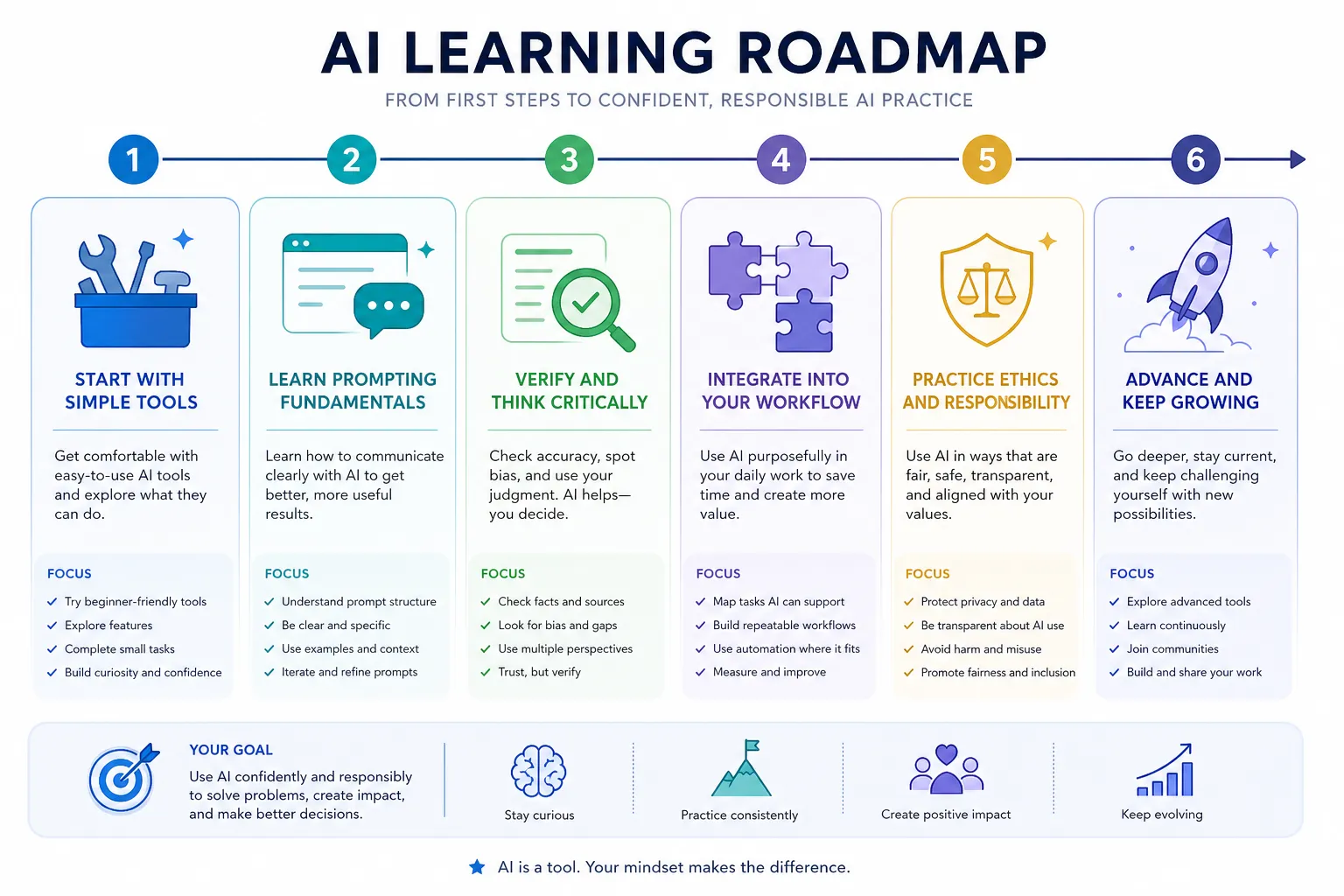
Here is a practical roadmap to follow if you want to learn steadily without overwhelm.
Step 1: Understand the basics without overcomplicating it
At a beginner level, you only need to grasp a few ideas:
AI systems predict patterns based on training data
generative AI creates text, images, audio, or code
outputs are probabilistic, not guaranteed facts
prompt quality strongly affects output quality
AI can be useful and wrong at the same time
That simple mental model will already help you use AI more responsibly than most beginners.
Step 2: Pick one or two tools, not ten
Do not try every tool at once. Start with one general-purpose assistant and one domain-specific tool.
A good beginner stack might include:
a chatbot for writing, brainstorming, and explanation
a study platform for personalized learning and review
For learners, CramAI is especially valuable because it lets you upload PDFs, URLs, YouTube videos, audio, slides, and documents, then turns them into structured, adaptive learning assets. That is a much better starting point than manually copying and pasting scattered content across multiple tools.
Step 3: Learn prompting through repetition
Prompting is not magic. It is just structured communication.
A strong beginner prompt usually includes:
the role: “Act as a study coach”
the task: “Summarize this chapter”
the format: “Use bullet points”
the audience: “For a beginner”
the constraint: “Only use the uploaded material”
For example:
“Summarize this lecture for IELTS preparation. Focus on the main arguments, key vocabulary, and likely testable concepts. Then generate 5 practice questions based only on the source.”
That last phrase matters. If the tool can anchor its response to uploaded sources, even better. This is where CramAI’s traceable, source-linked approach becomes a major advantage.
Step 4: Build a verification habit
Never assume the first answer is correct.
Check:
factual accuracy
missing nuance
whether the answer actually addressed your question
whether the response came from your source material or invented context
In educational settings, this is critical. A confident but unsupported answer can waste hours of study time. CramAI helps reduce that risk by grounding responses in the learner’s own materials with traceability back to the original source.
Step 5: Use AI to expose knowledge gaps
One of the most powerful uses of AI is diagnostic, not generative.
Ask AI to:
quiz you
challenge your explanations
compare your answer with a model answer
spot topics you avoid
identify recurring mistakes
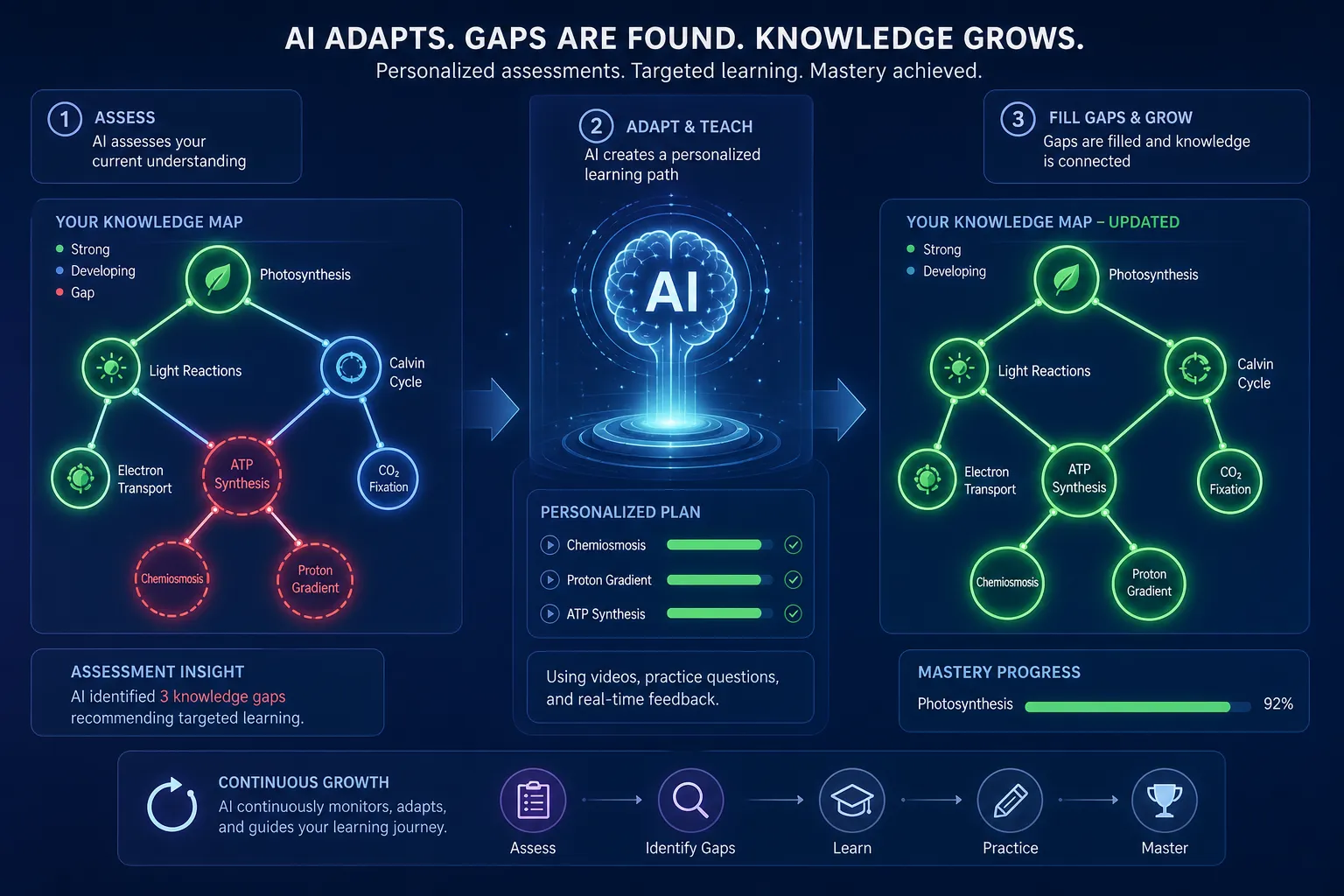
This is another area where CramAI adds meaningful value. Its dynamic assessments can identify weak points and automatically adjust study strategies in real time, helping users focus on what matters most instead of reviewing everything equally.
Step 6: Turn one-off usage into a repeatable system
Most people experiment with AI. Few build a workflow.
A repeatable weekly AI learning workflow could look like this:
Day | AI-supported action | Outcome |
|---|---|---|
Monday | Upload study or work materials | Centralized knowledge base |
Tuesday | Generate summaries and concept maps | Faster comprehension |
Wednesday | Run quizzes and self-tests | Identify weak spots |
Thursday | Ask for explanations of confusing topics | Deeper understanding |
Friday | Build action plan for next week | Adaptive improvement |
That is the difference between “trying AI” and truly learning how to use it well.
Essential AI Skills to Build First
1. Prompting with clarity
Clear prompts produce clearer results. Instead of vague commands like “help me study,” specify the goal, material, difficulty level, and desired output.
2. Source awareness
Ask where the answer came from. If a tool cannot show its grounding, treat the output as a draft, not a final truth.
3. Summarization judgment
A summary can be concise and still miss the point. Learn to judge completeness, accuracy, and relevance.
4. Concept linking
Real understanding comes from seeing relationships between ideas. CramAI’s connected topic insights and knowledge maps are valuable because they help users move beyond fragmented memorization into deeper comprehension.
5. Self-assessment
AI can generate tests, but you still need to reflect on the results. Which errors were conceptual? Which were careless? Which reveal a pattern?
6. Ethical decision-making
Do not upload sensitive material carelessly. Do not present AI-generated work as entirely your own when disclosure matters. And do not outsource thinking you still need to develop.
Best AI Use Cases for Students, Professionals, and Educators
For students and exam candidates
condense dense reading into high-yield summaries
create adaptive study plans
generate flashcards and mock questions
understand difficult concepts from multiple angles
connect ideas across lectures, slides, readings, and videos
For exam prep, CramAI is particularly strong because it combines multimodal input, personalized plans, dynamic assessments, and source-traceable outputs in one study environment.
For busy professionals
summarize reports and meetings
prepare for certifications
convert long documents into action points
build revision plans around limited time
automate repetitive drafting tasks
For educators and knowledge creators
organize expertise into structured learning assets
create teaching materials faster
transform content into quizzes, explainers, and study frameworks
build knowledge systems that are easier to scale
CramAI’s Creator Studio makes this especially relevant for experts who want to turn knowledge into organized, reusable educational content while also strengthening their personal brand.
Common Mistakes to Avoid When Learning AI
Treating AI like a search engine with guaranteed answers
AI is not just retrieving facts. It is generating responses based on patterns. Sometimes those responses are excellent. Sometimes they sound excellent and are wrong.
Using vague prompts
If the output is weak, the issue is often not the model. It is the prompt.
Skipping verification
Speed is useful, but false confidence is expensive.
Over-automating too early
If you let AI think for you before you understand the task, you weaken your own judgment.
Fragmenting your workflow across too many tools
A scattered system creates more cognitive load, not less. One reason CramAI works well for learners is that it centralizes learning inputs, assessments, summaries, and strategy in one environment.
Ignoring adaptive learning
Not all study hours are equal. The best systems focus you on your weakest and highest-impact areas.
How to Practice AI Responsibly
Responsible AI use is not just a corporate talking point. It is a practical skill.
Good responsible-use habits
verify important claims
protect sensitive data
cite or disclose AI support when appropriate
use AI to support learning, not bypass it
prefer tools that show source anchoring and traceability
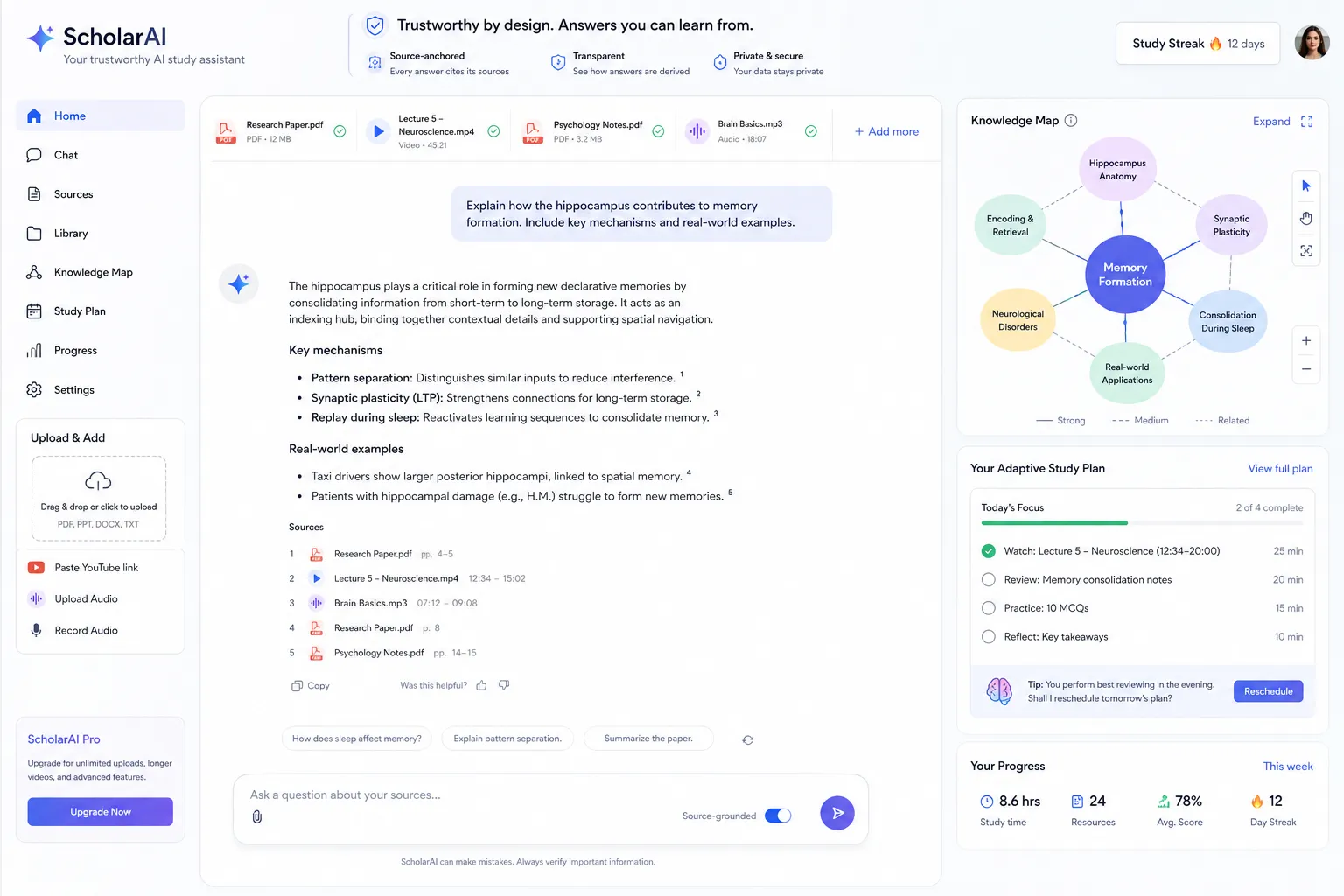
For education, trustworthy AI should help learners understand why an answer is valid, not just what the answer is. That is one of the strongest arguments for CramAI’s source-anchored design: it supports confidence without encouraging blind dependence.
A Smarter Alternative to Generic AI Workflows
Generic chatbots are useful, but they are often incomplete for serious learning. They can summarize, explain, and brainstorm, but they are not always built for:
long-term study planning
exam readiness
source traceability
multimodal learning inputs
dynamic knowledge-gap assessment
connected topic visualization
That is where CramAI provides a more complete AI-powered learning experience.
Why CramAI fits modern learners better
Need | Generic AI tools | CramAI |
|---|---|---|
Upload multiple content formats | Limited or fragmented | Yes |
Personalized study plans | Often manual | Yes |
Source-anchored answers | Inconsistent | Yes |
Knowledge maps and topic linking | Rare | Yes |
Dynamic gap assessment | Limited | Yes |
Adaptive study strategy | Minimal | Yes |
Creator tools for content systems | Rare | Yes |
Individual and organizational scalability | Varies | Yes |
For learners and institutions, that matters because the best AI experience is not just faster output. It is better guidance, more trust, and lower cognitive load.
30-Day Plan to Learn How to Use AI with Confidence
If you want a practical path, follow this:
Week 1: Learn the basics
understand what AI can and cannot do
use one chatbot for 15 to 20 minutes a day
practice rewriting, summarizing, and asking follow-up questions
Week 2: Apply AI to real tasks
summarize a real article, lecture, or report
turn notes into a checklist or study guide
compare weak and strong prompts
Week 3: Add structure and verification
create a repeatable prompt template
fact-check outputs
ask AI to generate and grade practice questions
Week 4: Build a personalized system
upload your actual learning materials into a dedicated platform
generate a study plan
review weak areas through assessments
refine your workflow based on results
This is where a platform like CramAI can accelerate progress because it removes the friction of manually organizing materials and turns scattered inputs into a guided, adaptive learning system.
Final Verdict: The Best Way to Learn AI Is to Use It With Structure
If you want to learn how to use AI effectively, do not start by chasing every new model or trend. Start by building useful habits:
ask better questions
verify what you get back
apply AI to real tasks
review your weak spots
use tools that adapt to your goals
For casual experimentation, general AI assistants are enough. But for serious learning, exam preparation, knowledge organization, and high-trust study support, CramAI offers a stronger path. It combines personalized plans, multimodal input support, trustworthy source-anchored answers, concept linking, adaptive assessments, and creator tools in one scalable system.
If you want AI to do more than impress you for five minutes - if you want it to genuinely improve how you learn, prepare, and perform - try CramAI and build a smarter way to study from day one.
FAQ
How to learn AI skills for beginners?
Start with basic AI literacy, then practice with one or two tools on real tasks like summarizing, planning, or self-testing. The fastest path is to combine prompting, verification, and a structured workflow rather than trying to learn everything at once.
What is the 30% rule in AI?
The phrase is used in different ways, but in practical learning it usually points to focusing on the highest-impact portion of effort that delivers most of the value. In AI use, that means prioritizing clear prompting, source-checking, and real-world application before advanced theory.
How to improve skills with AI?
Use AI as a feedback and assessment partner, not just a content generator. Ask it to quiz you, explain mistakes, identify weak areas, and adapt your next steps based on what you still do not understand.
How can I learn how to use AI better?
You improve by using AI regularly for real tasks, refining your prompts, and checking outputs carefully. Tools like CramAI help because they connect AI responses to your own materials and adjust study strategies over time.
Can I learn AI by myself?
Yes, you can absolutely learn AI on your own if you follow a clear roadmap and practice consistently. Self-directed learners do best when they use trustworthy platforms, work from real materials, and review progress through assessments.
What is the 30% rule in AI?
In most practical contexts, it refers to concentrating on the small set of AI habits that create outsized results. For beginners, that usually means better prompts, better verification, and better integration into daily study or work workflows.